


Integrated Development Environments
Allegro Integrated Development Environment for Windows, Linux, and Mac
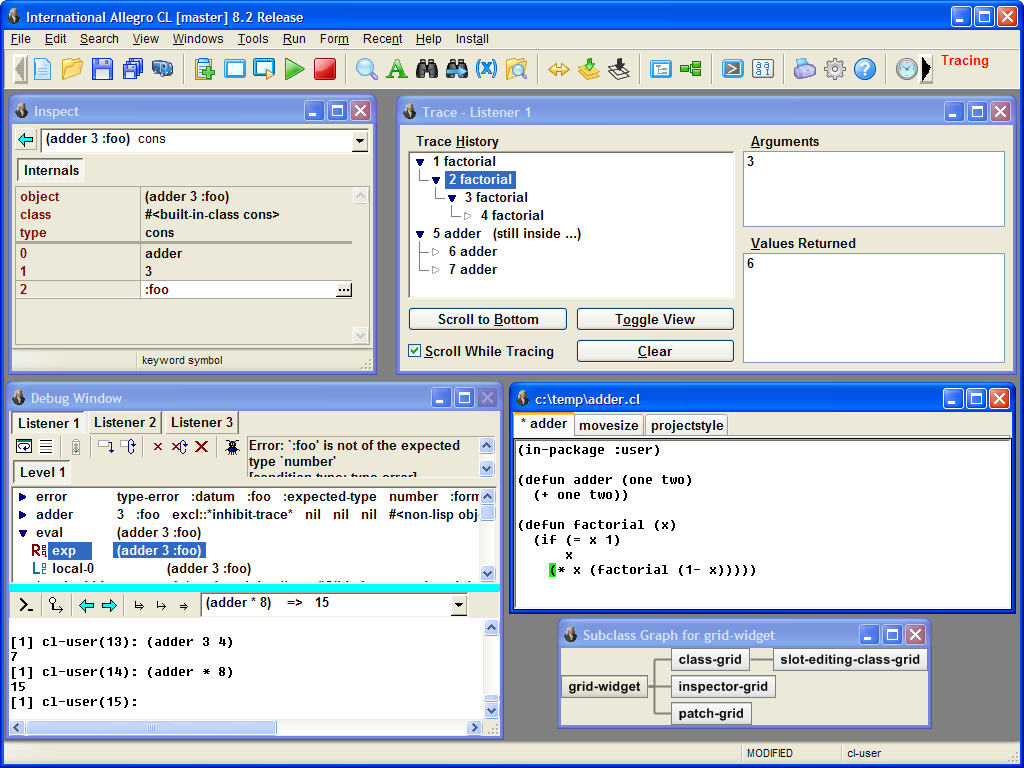
The IDE is the Allegro CL Integrated Development Environment. It works in concert with a windowing system called Common Graphics.
Allegro's IDE is a general environment for developing applications. Its wide variety of tool windows are "integrated" together by allowing you to invoke any tool on a Lisp object that appears in any other tool.
Features
- A project system for managing an application's files, testing the app within the IDE, and generating its standalone executable.
-
In addition to standard widgets (standard buttons, radio buttons,
drop-down lists, editable and static text, and many more, the IDE
supports additonal powerful widgets, such as
- Common Graphics Chart Widget. This widget which draws charts. See cg-chart-widget.htm.
- Common Graphics Grid Widget. A powerful and flexible tool for creating tables
- Common Graphics Class-grid Widget. A subclass of grid-widget which creates a grid with class slots as column heads and instances as rows. See class-grid.
- Menus are supported, both drop-down and pop-up, with submenus fully supported.
-
Other features include:
- HTML Widget in Common Graphics -- Used by the IDE help facility for better integration.
- Lisp listeners for evaluating expressions on the fly, a code editor, and an object inspector.
- Dialogs for tracing function calls, viewing the function stack, locating function definitions and strings, and browsing class hierarchies and methods.
- An interactive dialog builder that generates the lisp code for creating an application dialog.
- Handy help such as doc pages for every function and IDE tool, symbol completion and argument lists as you enter code, parenthesis matching and auto-indentation, and keyboard shortcuts for nearly all commands.
Documentation for Common Graphics and the IDE.
To order or to obtain more information on the IDE and the complete line of Allegro development and deployment products, please contact your account representative at: [email protected].
| Copyright © Franz Inc., All Rights Reserved | Privacy Statement | 
|

|

|

|

|

|