| Allegro CL version 8.2 Unrevised from 8.1 to 8.2. 8.1 version | ||||||||||
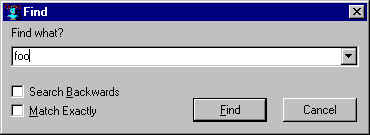
This dialog, displayed by Search | Find Forward or Search | Find Backward, allows searching for text in a window or widget of some sort (the search will be done in the selected window).
This is a modal dialog and it will disappear after use. Search | Find Again (which typically has a keyboard shortcut) can be used to find the same string again.
The field holding the string to look for is a combo box with previously searched for items stored.
Searching will be backwards (up in a Window) if Search Backwards is checked. Case of letters is ignored unless Match Exactly is checked.
Copyright (c) 1998-2016, Franz Inc. Oakland, CA., USA. All rights reserved.
This page was not revised from the 8.1 page.
Created 2010.1.21.
| Allegro CL version 8.2 Unrevised from 8.1 to 8.2. 8.1 version | ||||||||||