Project Manager Options Tab
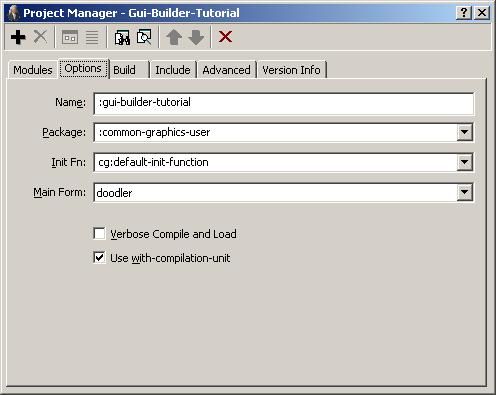
This tab on the Project Manager Dialog shows the values of several
options to projects:
-
Name: A name for the entire project. This should be a symbol
not naming any other project. This symbol is used to name the .exe,
.dxl, and certain other files that are created by the File | Build Project
Distribution and File | Build Project
Exe commands. The name also appears in the title-bar of the
IDE, and may be passed to find-project to find the project if it has been
loaded with load-project or
open-project. Using a keyword
for the name is recommended. The project name could be retrieved or
set programmatically by calling name or (setf name).
-
Package: Names the default package for source code that is
auto-generated for the forms of the project. This value should be a
keyword symbol that names a new or existing package, and this widget
will coerce a value that is entered here to a keyword symbol. It is
simplest to continue using the
common-graphics-user
package (the default), but another package may be used if desired. If
the value entered does not name a package, a new package is created
automatically with that name.
In any case, a basic defpackage form will be written into
the generated .lpr project definition file for
this project, to ensure that the package will always exist before it
is needed. This defpackage form will use the
cl, excl, and
cg packages, and will export any symbols that are
known to be exported from the package. You may add a more complete
defpackage form
elsewhere in the project code if needed; the package will then be
augmented rather than replaced, as usual when there are multiple
defpackage forms
for a package.
See project-package-name and form-package-name for
more information.
-
Init Fn: The function that is
run when the Run | Run Project command is invoked, or
when the standalone application that is generated from the project is
started up. The value must be a symbol naming a function that takes no
arguments. The function should perform whatever initialization is
needed, including creating any windows that should be displayed
initially. If it returns a window, the application will run until that
window is closed; otherwise the application will exit when the init
function returns. The default init function simply creates the
running window of the project's main form and returns it. See on-initialization, default-init-function, finder-function, and maker-function for more information.
-
Main Form: The form that is run by the default initialization
function when the Run | Run Project command is invoked or the
standalone application that is generated from the project is started
up. This form is also indicated on the General tab by a special
"moving window" icon. See main-form.
-
Verbose Compile and Load: whether
*compile-verbose* and *load-verbose* are bound to true when the
project is compiled and loaded. See ide:verbose.
-
Use with-compilation-unit: whether the entire project is
compiled inside a with-compilation-unit form, which avoids
warnings about called functions that are defined in later modules, for
example. See ide:compilation-unit.
See the general description of the
Project Manager Dialog for
details of the toolbar buttons.
Copyright (c) 1998-2016, Franz Inc. Oakland, CA., USA. All rights reserved.
The object described on this page has been modified in the 8.2 release; see the Release Notes.
Created 2016.6.21.