| Allegro CL version 8.2 Object described on page has changed in 8.2. 8.1 version | ||||||||||
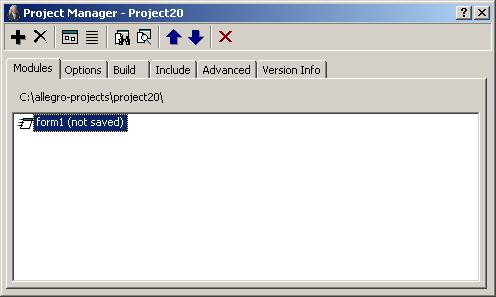
The Project Manager dialog displays information about the current project which is returned by current-project. Most information about projects is displayed and much can be changed by changing fields in the dialog. The Project Manager dialog is displayed by the View | Project Manager menu command.
As shown in the illustration, the Project Manager has six tabs, Modules, Options, Build, Include, Advanced, and Version Info.
The buttons on the Project Manager toolbar are (identified by their tooltip label and, in some cases, their icon):
Use the Move Up (up arrow) and Move Down (down arrow) buttons to place the new module in the desired location with respect to other modules.
Copyright (c) 1998-2016, Franz Inc. Oakland, CA., USA. All rights reserved.
The object described on this page has been modified in the 8.2 release; see the Release Notes.
Created 2016.6.21.
| Allegro CL version 8.2 Object described on page has changed in 8.2. 8.1 version | ||||||||||