Startup Action
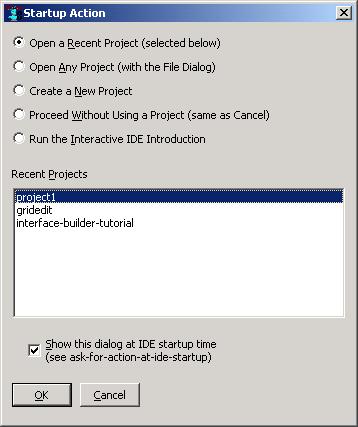
This dialog will appear at IDE startup when there are recent projects
to reopen. If there are no recent projects, this dialog does not
appear. (It also does not appear in the Allegro CL Express
Edition). The dialog asks whether to open one of the recent projects,
and also has other choices, such as whether to create a new
project. The choices are presented as radio-buttons:
-
Open a Recent Project (selected below): This is the initially
selected choice. (A list of recent projects is saved in the
prefs.cl file by the Tools
| Save Options Now command or the Tools | Save Options On Exit
command.) The list of recently-used projects are listed further below
on the dialog, with the most recently used project selected at the top
of the list. To open the most recently used project for further
development, simply click OK or press the Enter key. To open another
recently-used project, select it and press OK, or double-click it.
(This can also be done later by using the Recent |
Open Project command.)
-
Open Any Project (with the File Dialog): This option may be used
to find and open an existing project that is not included in the list
of recently used projects. (This can also be done later by using the
File | Open Project command.)
-
Create a New Project: This option creates a new empty project
for developing a new application.(Creating a new project can also be
done later by using the File | New Project
command.)
-
Proceed Without Using a Project: This option runs the IDE with no
current project. This is also done if you simply cancel the startup
dialog by pressing the Escape key or clicking the Cancel button. When
there is no current project, warning dialogs may appear if you try to
use certain project functionality such as showing the Project Manager
dialog, creating a new form, or clicking the Components toolbar. And
a few things may behave differently; for example, when saving an
editor buffer for the first time, you will not be prompted about
whether to add the new file to the current project, since there is no
current project.
-
Run the Interactive IDE Introduction This option starts up a
high-level introduction to the variety of development tools that are
available in the IDE. (No project is created or opened.) The
introduction may also be run with the Help | Interactive IDE
Intro menu command at any time.
This dialog may be disabled for future lisp sessions by unchecking the
check-box labeled Show this dialog at IDE startup time near the
bottom of the dialog. The dialog may also be enabled or disabled on
the IDE1 tab of the Options dialog
(displayed with Tools | Options) by using the check-box labeled
Ask for Action at IDE Startup, or by calling (setf
ask-for-action-at-ide-startup). When this dialog is
disabled, the IDE never opens or creates a project at startup time,
though you can open or create a project any time later.
This dialog is never shown if the IDE is started up with a
-project command line option for an initial project
to open. Instead, that project is always opened, regardless of the
value of ask-for-action-at-ide-startup. (This happens
when you double-click a .lpr project definition
file in the operating system's file manager.)
Various IDE windows may or may not appear when creating or opening a
project. For more information, see these IDE configuration options:
Copyright (c) 1998-2016, Franz Inc. Oakland, CA., USA. All rights reserved.
This page was not revised from the 8.1 page.
Created 2010.1.21.